BRASSERIE LICORNE

An Alsatian industrial brewery (190 employees, 750,000 hL/year, brand Licorne under the KarlsBräu group) needed to show thousands of retail points of sale on their WordPress site, filterable by product reference — a custom "revendeur" (retailer) post type with no built-in archive, driven entirely by custom WP_Query calls rather than WordPress' native archive system.
The data arrived as two denormalized CSVs from the supplier's ERP (Solvnet) — 19,696 rows (CHR: cafés/hotels/restaurants) plus 31,418 rows (GMS: large retail) — one row per (retailer, product) pair, so a single retailer could span dozens of consecutive rows. Neither file fit inside a single HTTP request. Products were named in free text with no shared identifier across systems, and there were no geographic coordinates anywhere in the source data.
A marketing team that needed the retailer map to just work, without ever touching a database or a WP-Cron schedule themselves — an admin screen with one upload button and a "delete all retailers" reset, nothing more.
Aggregate at parse time, deduplicate on two levels using the client's external key (`reseller_id`) — never a content hash.
19,696 + 31,418 raw rows collapse to 2,250 distinct retailers this way: intra-file, the first row for an ID creates the record and every following row for the same ID only appends its product to a running list; inter-import, a single SQL query with two INNER JOINs loads every existing retailer once per run so the plugin knows whether to create or update, rather than issuing one query per row.
Batches of 300 rows, orchestrated by a self-rescheduling WP-Cron job under a 40-second budget per run, with parsed CSV data and the existing-retailer index carried between runs via transients.
The full import cannot run inside one request or one cron invocation without hitting PHP's execution limits. Chunking it and persisting progress between runs — while re-forcing WP-Cron via `spawn_cron()` so the job does not wait for organic site traffic — turns a single fragile operation into a resumable sequence with no `set_time_limit()` or raised `memory_limit` anywhere: the chunking itself is what works around the ceiling, not raising it.
Product matching by tokenized, normalized string comparison with prefix fallback; geocoding that never overwrites an existing coordinate.
Free-text product labels like "Licorne Black - 50 cl" and "Licorne Black - 75 cl" cannot be joined on an exact match — the resolver strips accents, lowercases, splits on separators, then matches by equality OR by prefix (`strpos($inputToken, $mappedToken) === 0`) against a per-segment mapping field on each product. And once a retailer has been geocoded once, a `meta_query` selects only rows with a missing latitude/longitude for re-geocoding — re-running the import must never silently degrade or replace a correct coordinate with a worse one.
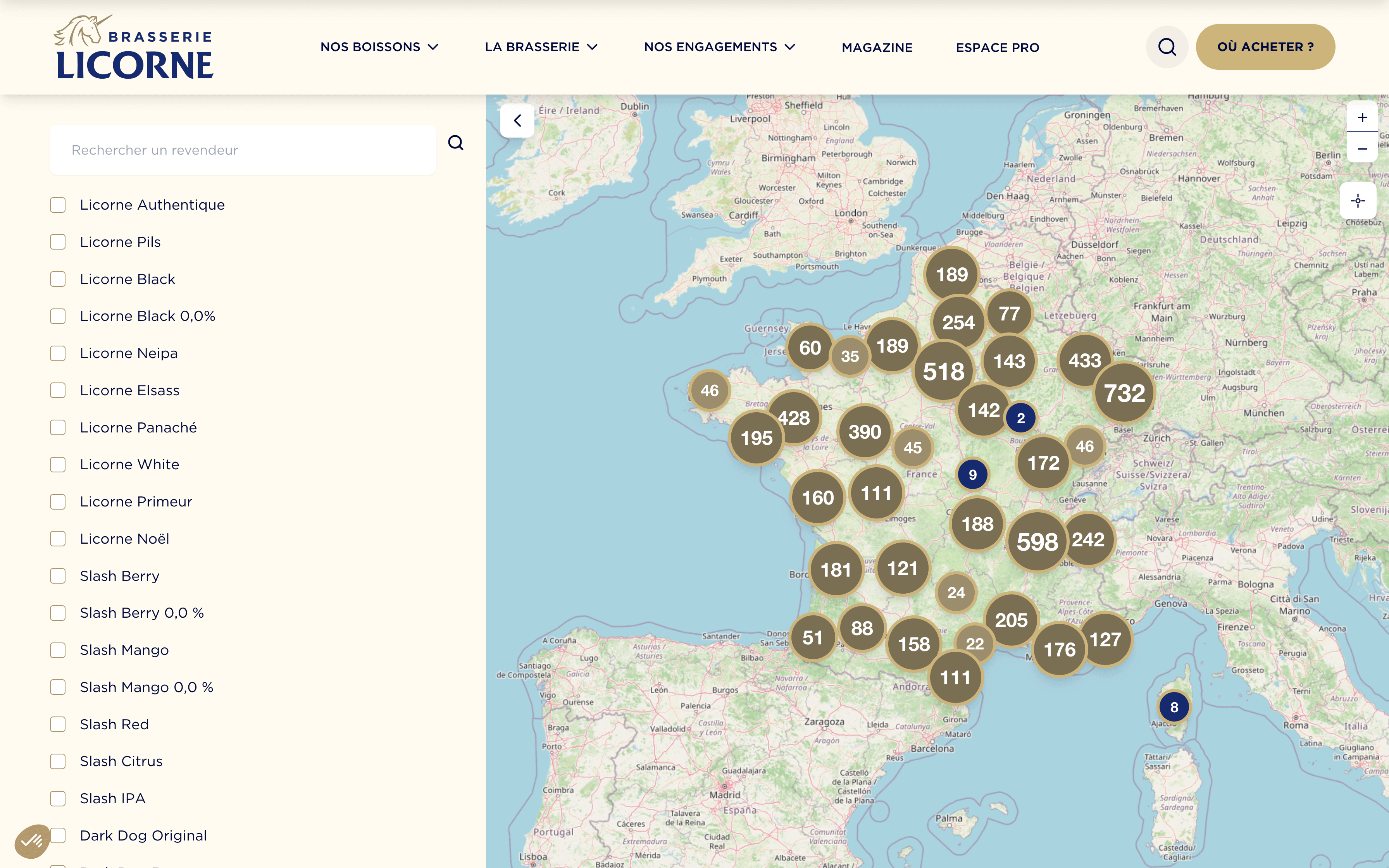
A Leaflet map with canvas-rendered clustering (`preferCanvas: true`, `chunkedLoading: true`), filtering and free-text search done entirely client-side against `data-*` attributes.
All 2,250 retailers are injected into the page HTML once (two unpaginated `get_posts()` calls with `no_found_rows` and `update_post_term_cache => false` to lighten each), read into Leaflet markers on mount, then filtered in memory: adding/removing product or type filters just calls `addLayer`/`removeLayer` on the already-loaded markers — no round trip to the server on every filter change, at the cost of one heavier initial page load.

Reverted the supplier's automated API integration — roughly 1,500 lines removed thirteen days after shipping it.
The first version pulled retailer exports automatically from the Solvnet ERP API. It worked in principle, but the export was asynchronous and its response time undocumented: the retry delay before downloading a ready export was recalibrated four separate times in a single afternoon (12:02 → 16:32) chasing an `ErrorNoneFileForExecId` error, and a debug script was found testing the same call with SSL verification disabled — signs of a genuinely unstable integration, not a one-off bug. Reverting to manual CSV upload — while keeping the robust parsing/dedup/geocoding pipeline built for the automated version — swapped a fragile technical dependency on an undocumented third-party API for a simple human one: someone exports the file from the ERP and drops it in. That is the best decision in this project, and it is a reversal, not a success story.
No automated tests on the parsing/dedup/geocoding pipeline, and no monitoring on the cron itself.
This was agency work under a fixed budget, and the pipeline was validated by hand against the real CSVs before shipping — plus a diagnostic panel, visible only to administrators, listing every product with its resolved retailer count directly inside the map template. That is a reasonable trade-off for a one-off import script; it stops being reasonable the moment the supplier changes their export format and nothing catches it automatically, which has already happened once (a header-validation rewrite was needed mid-project when the source format changed).
There is no dashboard on this pipeline today — its correctness was proven once, by hand, against the real data, not tracked over time. If I instrumented it, geocoding failure rate is the number I'd want first: the rule never overwrites an existing coordinate, which is safe, but it also means a retailer that failed to geocode once stays unlocated forever unless someone notices via the admin diagnostic panel.
I'd add tests on the deduplication and product-matching logic from the start instead of trusting a manual check against the source CSVs — a prefix-match resolver is exactly the kind of thing that looks correct until two products with a shared prefix ("Slash Mangue" vs. "Slash Mangue Passion") silently capture each other's rows. I'd also fix the AJAX endpoints that check a nonce without first verifying it was actually supplied (`isset()` missing before `wp_verify_nonce()`), rotate the Google Maps key that is currently hardcoded in the client-visible admin template, and put a monitor on the cron itself — the same discipline I later applied on FileDrop.